
The Desktop Experience
Search Help (AI-Powered)
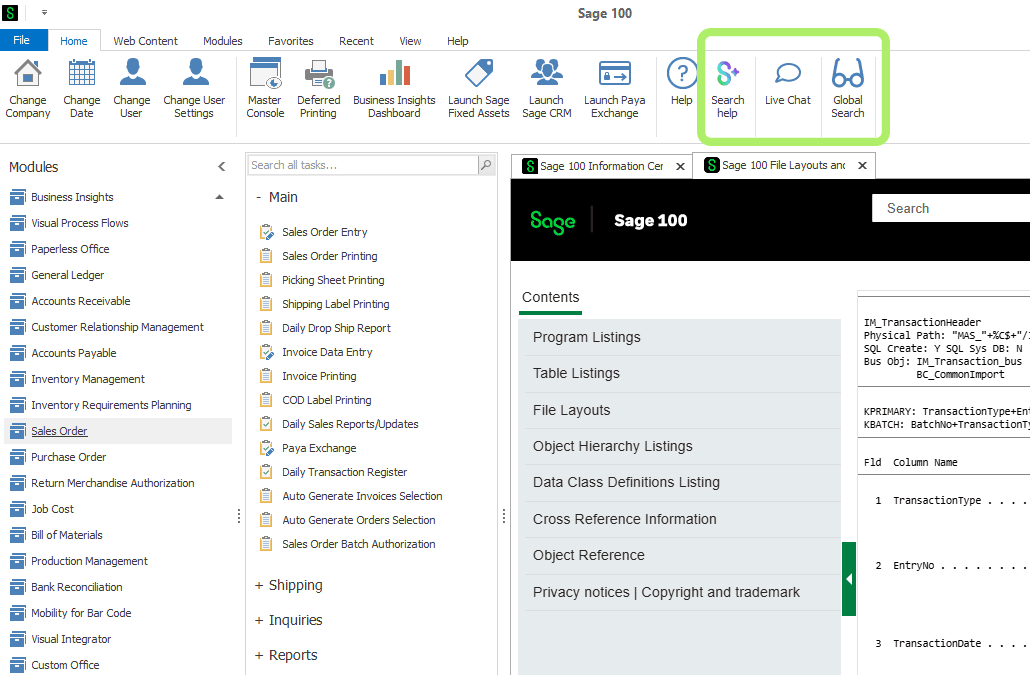
Sage 100 now includes a built-in AI-powered help tool called Search Help, accessible directly from the Desktop Home tab and the Information Center page. (This feature was originally introduced as the Sage Help Agent and was renamed to Search Help in the 2026.1 update.) Users can ask questions in natural language and be guided to the correct help documentation. This is Sage's first embedded AI feature in the core product and a meaningful step toward making the software more accessible to newer users.
Global Search
Also on the Home tab, the new Global Search feature lets users search across all Sage 100 data without opening individual modules. For example, you can find all AR invoices for a specific salesperson, or all inventory items assigned to a particular warehouse, from a single search bar. This was a top request from the Sage 100 community.
Paperless Office Enhancements
Paperless Office received several meaningful upgrades in this release:
- Consolidated Emails: Multiple forms (such as invoices) can now be sent in a single email to a specific customer or vendor, instead of one email per form. Attachments can optionally be zipped. Delivery of consolidated emails can also be scheduled via Task Scheduler.
- Picking Sheets to Warehouse: Sales Order picking sheets can now be printed to PDF and emailed directly to warehouse recipients, streamlining fulfillment workflows.
- Scheduled Attachments: Additional file attachments can now be set up to be automatically included with outgoing forms on a scheduled basis.
- Expanded Email Message Options: Unique email messages can now be created for specific document types within a group (for example, separate messages for invoices vs. credit memos in the S/O Invoice group).
If your business sends high volumes of documents to customers or vendors, these enhancements represent a significant time savings and are worth a configuration review.
Security & Audit Controls
Audit Tracking for Roles and Users
A new audit trail feature now records all additions, changes, and deletions to role and user settings in Library Master. New Role Audit and User Audit Reports are available when enabled, and administrators can view change history directly through the Audit Viewer button in Role and User Maintenance. This is particularly valuable for companies with audit requirements or multi-user environments.
Enhanced Password Validation
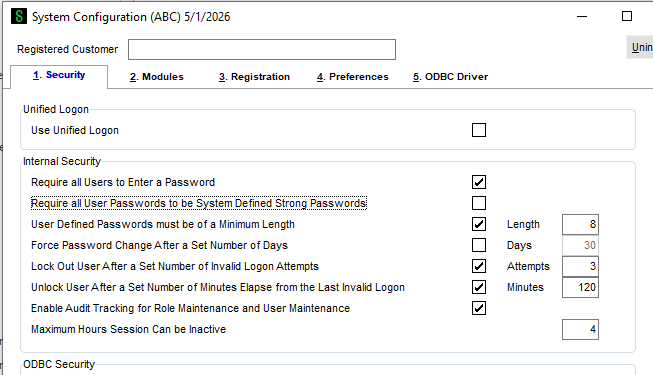
Password validation settings are now enabled by default in System Configuration, and a new Maximum Hours Session Can Be Inactive field has been added to automatically log out inactive users, a practical and straightforward security improvement.
Inventory & Distribution
Expanded Lot/Serial Number Field
Lot and serial number fields have expanded from 15 to 50 characters across Accounts Receivable, Inventory Management, Production Management, Sales Order, Purchase Order, and several other modules. A new Lot/Serial Number Conversion Utility is available to optionally convert existing numeric lot/serial numbers to the new length by inserting leading zeros. Existing numbers are not automatically converted.
FDA Food Traceability (FSMA Compliance)
For companies subject to FDA Food Safety Modernization Act requirements, Sage 100 2026 adds the ability to track lot code source and country of origin for items on the FDA Food Traceability List (FTL). This includes a new Lot Code Source History Report on the Inventory Management Reports menu. Note: this feature requires a subscription plan.
Inventory Quantity Available Improvements
Two new options have been added in Inventory Management Options to improve how Quantity Available is calculated for companies using work tickets, allowing raw materials and finished goods to be handled separately for more accurate availability reporting.
Sales Order & Purchase Order
- Order Total now visible on the Payment tab when entering a credit card deposit in Sales Order Entry.
- Picking Sheet memos from Sales Orders are now accessible in Shipping Data Entry via a new Memo button.
- Package Tracking Number field expanded from 30 to 40 characters to accommodate FedEx Ground and DHL eCommerce formats.
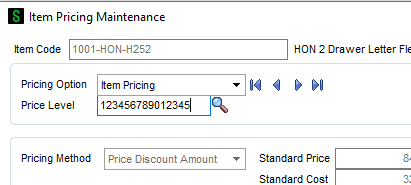
- Price Level field expanded from 1 to 15 characters, supporting more complex pricing structures across Accounts Receivable, Customer Relationship Management, Inventory Management, eBusiness Manager, Job Cost, Return Merchandise Authorization, and Sales Order.
- Options added in both Sales Order and Purchase Order to skip prompts for cancellation codes when they are not required.
Other Highlights
- Crystal Reports updated to SAP Crystal Reports 2025 (SP34 for both x86, which is the 32-bit version, and x64, which is the 64-bit version).
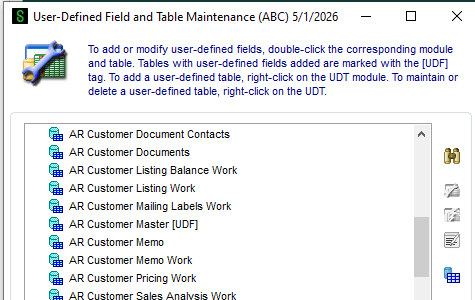
- Custom Office: Tables with User-Defined Fields are now tagged with [UDF] in User-Defined Field and Table Maintenance, making them easier to find.
- Inventory Requirements Planning: New Warehouse Group functionality allows IRP to consolidate recommendations across warehouse groups or recommend inventory transfers between warehouses.
- Visual Integrator: Improvements to the Expression Builder and new Add/Subtract Value operations in Import and Export Field Properties.
- Sage Supply Chain Intelligence: New sync options let you control which purchase orders sync to Sage Supply Chain Intelligence at the vendor and order level.
What's New in Sage 100 2026.1
Sage released the 2026.1 update on July 21, 2026, adding a few more enhancements on top of the initial 2026 (7.5) release:
- Search Help renamed: The AI-powered help tool originally called the Sage Help Agent is now named Search Help. The functionality is unchanged — it's still accessible from the Desktop Home tab and Information Center page.
- Form 1099 Reconciliation Report: A new report on the Accounts Payable Reports menu lets you print 1099 information for selected vendors and compare it against your Aatrix 1099 forms before year-end processing.
- ACH Maintenance default value: If the Company Entry Description field is left blank in ACH Maintenance, the file will now default to "PURCHASE" rather than remaining blank.
- Enhanced Cost Detail visibility: For lot items in Item Maintenance, the Lot Code Source and Country of Origin fields now display directly on the Cost Detail tab.
If you're planning your upgrade now, you'll be moving straight to 2026.1 and will get these along with everything covered above.
Before You Upgrade: What to Check
Sage 100 2026 is a more significant upgrade than a typical annual release. The 64-bit-only architecture means a few things in your environment may need attention before you install. Here is what to verify.
Is your Sage 100 installation already 64-bit?
Sage made 64-bit the default starting with version 2021, so many customers made this transition already. However, some customers on versions 2021–2025 opted to stay on 32-bit due to third-party add-on compatibility. If you are not certain which you are running, we can check in minutes. If you are on 32-bit, Sage provides the 32_64_Bit_Switch_Utility.exe to convert your existing installation — or you can install 2026 on a new server, but please contact us to plan the migration sequence for your environment, as workstation behavior during a parallel installation needs to be evaluated case by case. You can also reference the Sage 100 2026 64-Bit Only FAQ.
Sage Alerts & Workflow (KnowledgeSync) users
Sage Alerts & Workflow (KnowledgeSync) remains a 32-bit application but is fully compatible with 64-bit Sage 100 2026 through a supported dual ODBC configuration (Sage KB Solution 260423182011090). You need one 32-bit System DSN for the Alerts & Workflow runtime and one 64-bit System DSN for the Crystal Reports designer, both using the same DSN name and settings. No product replacement is required. Contact us before upgrading and we will configure this for you.
Crystal Reports 2025 and custom reports
Sage 100 2026 upgrades the bundled Crystal Reports to version 2025. If you only run standard Sage 100 reports, you will notice no impact. If you have custom reports, invoices, checks, or forms built in Crystal Reports, test them in a staging environment first. Sage includes the Crystal Form Comparison Report utility (run SYWFCU from File →Run) to identify which custom forms need attention, and the Crystal Reports Conversion Wizard to convert them.
Sage CRM users
Starting with Sage CRM 2026 R1, Sage CRM is no longer installed through the Sage 100 installer — it is now a standalone product. The Sage 100 CRM integration components are included in the Sage 100 build separately. If you use Sage CRM, your upgrade process will look different. Contact us before upgrading and we will walk you through the updated procedure.
Windows and OS requirements
Sage 100 2026 requires 64-bit Windows. The installer will not run on 32-bit Windows at all. 64-bit Windows 10 is technically supported (per Sage’s official FAQ), though Microsoft ended mainstream Windows 10 support in October 2025, so upgrading to Windows 11 is strongly recommended. In a network setup, workstation PCs also need to be 64-bit.
Not sure whether your environment is ready? A pre-upgrade assessment covers your 32/64-bit status, third-party add-on compatibility, Crystal Reports custom forms, and OS readiness — everything you need to upgrade with confidence. Contact us to schedule.
Sage 100 2024 vs. 2025 vs. 2026: Key Differences at a Glance
If you are deciding whether to upgrade now or evaluating how far behind your current version is, this table covers the most important differences between the three currently supported releases.
Note on the 64-bit-only change: The “64-bit ONLY” row above is the single most operationally significant change in 2026. If you are currently on a 32-bit Sage 100 installation, you cannot install 2026 on the same server without first converting or migrating. See our companion post on the 64-bit transition for the full checklist.
Payroll 2.26.1: No Tax on Overtime and What You Need to Configure
Sage 100 2026 ships alongside Payroll version 2.26.1, which includes compliance changes driven by the One Big Beautiful Bill Act (OBBBA, Pub. L. 119-21, signed July 4, 2025). If your organization processes U.S. payroll with overtime, this is not optional reading.
What the OBBBA introduced
The OBBBA created a federal income tax deduction for qualified overtime compensation under IRC §224, effective tax years 2026 through 2028. The deduction applies to FLSA-eligible overtime paid above 1.5× the regular rate. The maximum deduction is $12,500 per year ($25,000for married filing jointly), phasing out at $150,000/$300,000 AGI. Tips under IRC §222 are handled separately under the same legislation.
What Sage added in Payroll 2.26.1
- A new FLSA Wages Eligible for No Tax on Overtime checkbox in Earnings Code Maintenance must be enabled for each qualifying overtime earnings code. This does not happen automatically.
- A new Qualified Nontaxable OT field in the Employee Benefits window tracks the year-to-date qualifying amount per employee.
- W-2 reporting: For tax years 2026–2028, qualified overtime amounts report in Box 12 using new code TT (description: OBBBTT). For tax year 2025, IRS Notice 2025-62 provided transition penalty relief and Box 14 was used instead.
- A new Print Nontaxable Overtime Amounts option on check stubs is available for tax years 2026–2028.
- A new Reference Code field in Direct Deposit Maintenance supports the 2026 NACHA ACH rule change requiring a reference code in the Company Entry Description field for direct deposit transmissions.
What you need to do
- Confirm you are running Payroll 2.26.1 (included with Sage 100 2026; also available as a standalone update for 2024 and 2025 users).
- Review your Earnings Codes and check the FLSA Wages Eligible for No Tax on Overtime box for any overtime earnings code that qualifies under FLSA. Contact us if you are unsure which codes qualify.
- Review your Direct Deposit setup and add the Reference Code field if your payroll includes ACH direct deposit.
- Do not wait until year-end W-2 preparation to configure this. Incorrect setup through the year creates W-2 amendment work and potential employee relations issues.
If you process U.S. payroll with overtime and have not yet configured your Earnings Codes for OBBBA compliance, contact us. This is an important step to protect your 2026 W-2 accuracy.
Frequently Asked Questions: Sage 100 2026
These are the questions we hear most often from customers planning their upgrade. If your question is not here, contact us directly.
Is Sage 100 2026 really 64-bit only? What does that mean?
Yes. Starting with version 7.5 (2026), Sage 100 is exclusively a 64-bit application. You cannot install it on a server that currently runs a 32-bit version of Sage 100 in production. Sage recommends using the 32_64_Bit_Switch_Utility.exe to convert first. If conversion is not possible, a separate server is required.
Can I skip versions? For example, can I upgrade directly from 2023 to 2026?
Yes. Sage 100 supports multi-version upgrades. You can go directly from 2023 to 2026. However, you will need to review all release notes and upgrade guides for every version you skip, as data conversions and configuration changes accumulate across versions. We can walk you through a multi-version upgrade plan. If you have third-party add-ons or integrations — including Sage Alerts & Workflow, custom Crystal Reports, or any connected applications — contact us before upgrading, as third-party compatibility does not always follow the same version path as the core product.
What versions of Sage 100 are currently supported?
As of April 2026, Sage officially supports the three most recent releases: 2026 (7.5), 2025 (7.4), and 2024 (7.3). Sage 100 2023 (version 7.2) reached end of support with the release of 2026. Customers on 2023 or older are no longer receiving bug fixes, security updates, 1099 form updates, or payroll tax table updates.
Will my custom Crystal Reports still work after upgrading?
Sage 100 2026 upgrades Crystal Reports to Designer 2025. Standard reports that ship with Sage 100 will work fine. Custom reports (including modified invoices, checks, POs, packing slips) need to be tested and may require conversion using the Crystal Reports Conversion Wizard. Only one version of Crystal Designer can be installed per workstation. Run the Crystal Form Comparison Report (SYWFCU) before upgrading to inventory what needs attention.
Is KnowledgeSync compatible with 64-bit Sage 100 2026?
KnowledgeSync (Sage Alerts & Workflow, now supported by ECI Software Solutions) is a 32-bit application. Because Sage 100 2026 is 64-bit only, KnowledgeSync compatibility must be confirmed with ECI before upgrading. Do not upgrade to Sage 100 2026 if you use KnowledgeSync without first confirming a compatible version is available. Contact us if you need help evaluating this solution or finding an alternative solution.
Which Payroll version do I need for OBBBA “No Tax on Overtime” compliance?
You need Payroll version 2.26.0 or later. Payroll 2.26.1 (released April 2026 alongside Sage 100 2026) includes the No Tax on Overtime configuration fields, the NACHA Reference Code field, and the updated W-2 Box 12 code TT for tax years 2026–2028. Payroll 2.26.1 is available as a standalone update for customers on Sage 100 2024 and 2025 who are not yet upgrading the full ERP.
What is Search Help, and is it the same as Sage Copilot?
Search Help (originally launched as the Sage Help Agent, renamed in the 2026.1 update) is an AI-powered help tool embedded in the Sage 100 Desktop (Home tab and Information Center). You ask questions in plain English and it guides you to the correct Sage 100 help content. It is specific to Sage 100 ERP (and Sage 300). Sage Copilot is a separate AI feature for Sage Intacct and is not part of the Sage 100 product.
Is Sage 100 being discontinued in favor of Sage Intacct?
No. Sage has not announced any sunset or discontinuation of Sage 100, it remains a powerhouse ERP for small and medium sized businesses. Sage does actively market Sage Intacct as its cloud-first ERP for growing businesses, and some customers do migrate from Sage 100 to Intacct over time. But Sage 100 continues to receive annual releases with meaningful enhancements, and the 2026 release represents continued investment in the platform. If you are evaluating whether Sage 100 remains the right fit for your business, we are happy to help you with that process.
Does Sage 100 2026 work on Windows 10?
No. Sage will not test or certify Sage 100 2026 on Windows 10. This also applies to the 2025.2 and 2024.4 updates. Microsoft ended mainstream Windows 10 support in October 2025. Any workstations or servers still running Windows 10 should be upgraded to Windows 11 (or a supported server OS) before installing Sage 100 2026.
How do I convert existing Lot/Serial numbers to the new 50-character length?
Existing lot/serial numbers are not automatically converted. The field simply expands to accommodate longer numbers going forward. If you want to pad existing numeric lot/serial numbers with leading zeros to bring them to a consistent length, Sage 100 2026 includes the new Lot/Serial Number Conversion Utility (accessible via File > Run > *utl). Only purely numeric lot/serial numbers can be converted; alphanumeric numbers are not changed.
Ready to upgrade?
Sage 100 2026 is a strong release with practical improvements across the board. If you’re planning your upgrade, remember that 2026 is 64-bit only. Check out our companion post on the 64-bit transition and what it means for your environment. Or contact us to schedule a quick upgrade readiness assessment.
Schedule a Free ERP Upgrade Assessment





.svg)
.png)