


What Makes ERP for Wholesale Distribution Different
Not all ERP systems are created equal. A platform that works brilliantly for a professional services firm or a manufacturer can be a poor fit for a distributor — and the reasons are specific.
Wholesale distribution is fundamentally an operations and logistics business. Your margins may be thin (many distributors operate on 1–5% net), your order volumes are high, and your competitive advantage lives in your ability to get the right product to the right customer at the right time, at the right cost. That means your distribution ERP software needs to perform across every dimension of how the business actually runs — not just the warehouse floor:
- Inventory management — real-time visibility across locations, intelligent replenishment, lot and serial tracking, and cycle counting without disrupting operations
- Order management and fulfillment — fast, accurate processing from customer PO receipt through pick, pack, and ship, with support for partial shipments, backorders, and drop-ship
- Financial management — core accounting, accounts payable and receivable, multi-entity consolidation, multi-currency, and the reporting your leadership team and outside stakeholders actually need
- Purchasing and procurement — automated replenishment, supplier management, multi-vendor pricing, and demand-driven purchase planning that keeps inventory levels aligned with real sales patterns
- Reporting and analytics — real-time visibility into inventory turns, margins by SKU and customer, vendor performance, and custom reports you can build without a developer
- Customer-specific pricing — volume tiers, contract pricing, and promotional pricing that applies correctly across every order and every channel
- EDI integration — automated order exchange with large retail trading partners like Walmart, Amazon, and major grocery chains
- eCommerce and multi-channel connectivity — syncing B2B portals, online storefronts, and marketplace orders with your warehouse and financials in real time
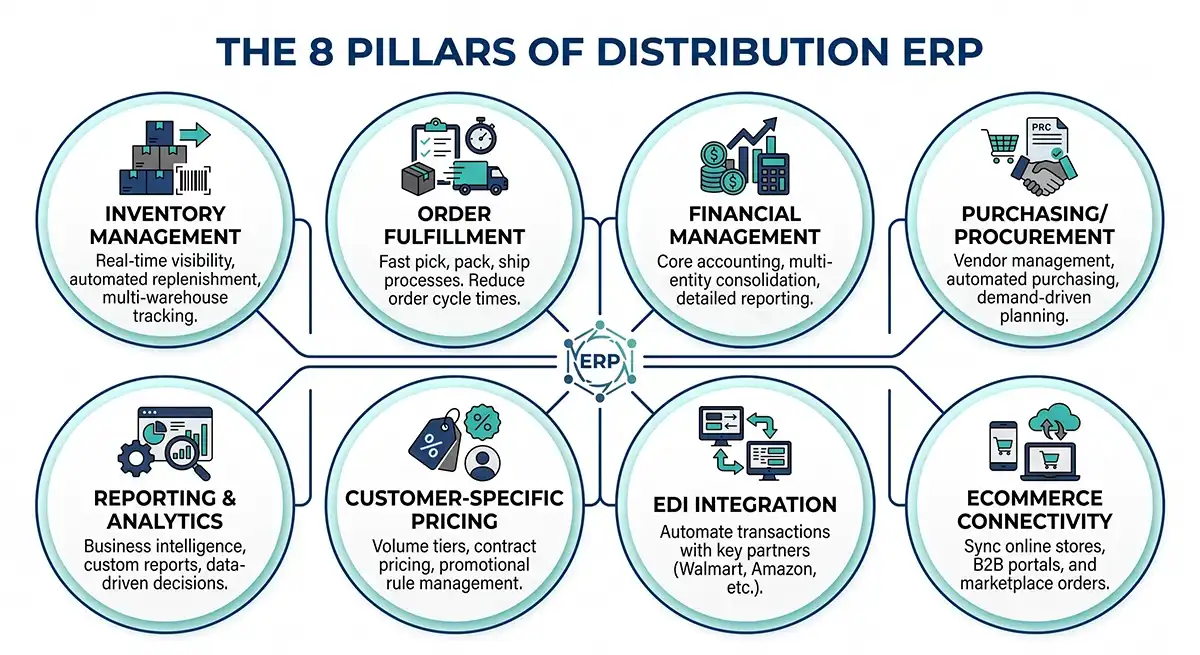
A generic accounting system can handle pieces of this. A well-implemented ERP for distribution companies connects all of it —eliminating the spreadsheets, manual reconciliations, and disconnected tools that quietly eat margin and staff time in most distribution operations.
The 6 ERP Systems Wholesale Distributors Evaluate Most Often
Based on working with small and mid-market distributors for40 years, these are the six platforms that come up most frequently in serious evaluations — and what you need to know about each one. (Note: this guide focuses on general-purpose ERP platforms. Vertically-specific platforms likeEpicor Prophet 21 are outside our scope here, but worth researching separately if you’re in industrial or electrical distribution.)
1. Acumatica
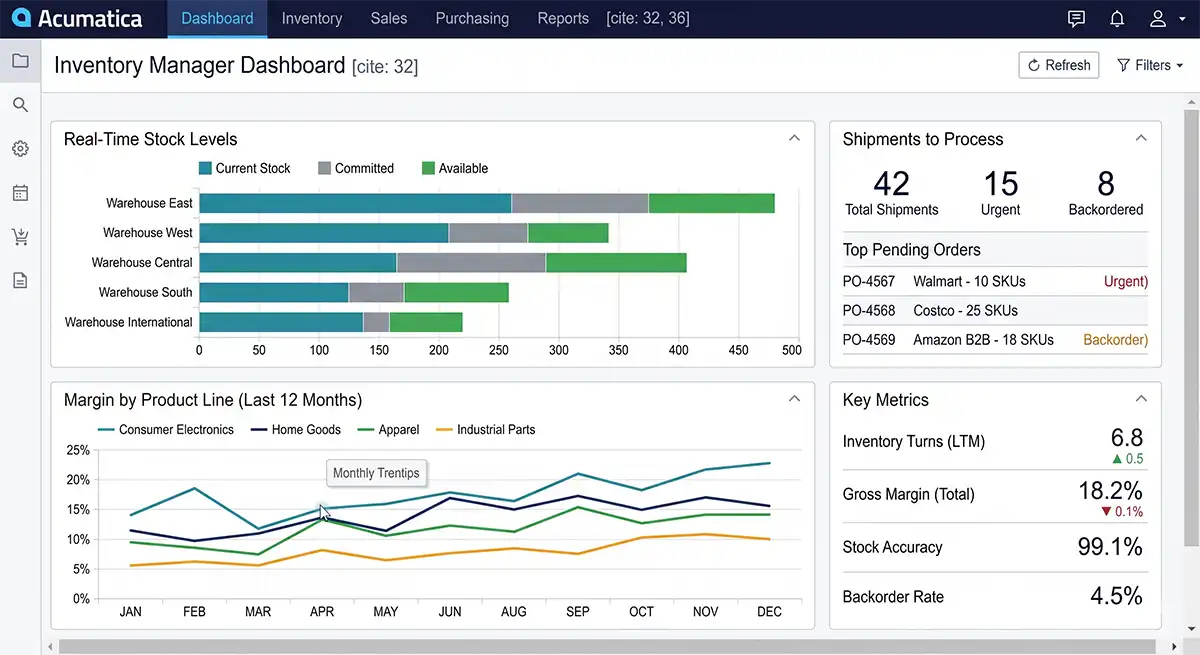
Acumatica is a modern, cloud-native ERP platform built for growing mid-market businesses. For wholesale distributors, it's one of the strongest wholesale distribution software options available — particularly for companies managing multiple warehouses, multiple locations, or a mix of B2B and eCommerce order channels.
What Acumatica does well for distributors:
- Comprehensive distribution functionality in a single platform — inventory, order management, purchasing, warehouse management, financials, and CRM share one database with no synchronization required
- Strong financial management with multi-entity, multi-currency, and intercompany transaction support — useful for distributors with complex organizational structures
- Unlimited user pricing model — you pay based on transaction volume, not headcount, which matters when you're adding warehouse staff or giving suppliers and customers system access
- Native multi-warehouse and multi-location inventory management with real-time visibility across all locations
- Highly configurable workflows that can be adapted to match how your operation works without custom development
- Strong reporting and dashboards with role-based views for operations, finance, and sales — and growing AI-powered analytics capabilities
- Good native connectivity for eCommerce channels and trading partner integrations
Where Acumatica has limitations:
- Higher upfront implementation cost than Sage 100 for simpler, single-location operations
- The platform's breadth means implementation takes longer if you try to configure everything at once — phasing is important
- Some highly specialized distribution verticals may need ISV add-ons for niche requirements
- Implementation quality varies significantly by partner— the configuration flexibility that makes it powerful also means a weak implementation partner can underdeliver
Best fit: Wholesale distributors with $10M–$150M in revenue, multi-location or multi-entity operations, or businesses that want a fully integrated cloud platform that can scale without replacing the system as they grow.
2. Sage 100
Sage 100 is a mature, highly reliable ERP platform with a long track record in distribution. It's been the backbone of small and mid-market distribution businesses for decades — and it earns that loyalty through rock-solid inventory management, strong reporting, and a deep ecosystem of distribution-specific add-ons.
What Sage 100 does well for distributors:
- Proven, deep inventory management — lot tracking, serial number tracking, bin and warehouse management, and multi-location stock control refined over decades of distribution deployments
- Strong core financial management with solid accounts payable, accounts receivable, cash management, and general ledger functionality
- Excellent reporting and business intelligence out of the box, with flexible report customization that doesn't require a developer
- Lower total cost of ownership for smaller or less complex distribution operations compared to platforms positioned at larger enterprises
- A mature, stable platform with a long track record —fewer surprises in production than newer platforms still working out edge cases
- Available as cloud-hosted or on-premise, giving businesses with specific infrastructure or compliance requirements flexibility in how they deploy
- Deep integration ecosystem for EDI, eCommerce, and other distribution-specific connections — including purpose-built connectors from experienced Sage partners
Where Sage 100 has limitations:
- Less suited to rapidly scaling multi-location operations or businesses with complex multi-entity financial structures than cloud-native platforms like Acumatica
- The user interface is more traditional — staff accustomed to modern SaaS tools may have a steeper adoption curve
- Per-user licensing can increase total cost meaningfully as headcount grows
- Some advanced capabilities — warehouse management, advanced planning — may require add-on modules
Best fit: Established wholesale distributors with $5M–$50M in revenue, single or dual-location operations, or businesses that want a proven, reliable platform with a lower total cost of ownership and don't need the full complexity of a cloud-native enterprise system.
3. Sage Intacct
Sage Intacct occupies a distinct position in this comparison. Where most ERP platforms are built around operations first — with financials supporting the warehouse and order management core — Sage Intacct is built around financial management first, with distribution operations layered on through its Sage Operations module (formerly known as SDMO for Sage Distribution and Manufacturing Operations.) That architecture makes it the wrong fit for some distributors and exactly the right fit for others. Understanding which category you fall into is the key to evaluating it accurately.
What Sage Intacct does well for distributors:
- Class-leading financial management — multi-entity consolidation, intercompany transactions, and financial reporting are arguably stronger than any other platform in this guide for businesses with complex organizational structures. Intacct is AICPA preferred software, and its audit trail and compliance capabilities are enterprise-grade
- Native inventory management including multi-location tracking, FIFO/LIFO/average costing, lot and serial tracking, barcoding, automated replenishment, and order management — more capable out of the box than its reputation sometimes suggests
- Full distribution operations through Sage Operations (SDMO) — advanced warehouse management, order fulfillment, supply chain workflows, and demand forecasting extend the platform into a complete distribution solution
- True cloud platform with strong multi-currency support and real-time financial visibility across entities — well-suited to distributors who have grown through acquisition or operate across multiple subsidiaries
- Strong reporting with dimensional accounting that provides deep visibility into profitability by entity, location, product line, or customer without requiring custom development
- Particularly strong fit for distributors with outside investors, formal audit requirements, or who are on a path toward a transaction— the compliance and financial reporting depth is built for that level of scrutiny
Where Sage Intacct has limitations:
- The Sage Intacct + Sage Operations combination is a two-module architecture, not a single fully integrated platform — implementation is more complex than Acumatica or Sage 100 as a result, and cost reflects that
- EDI is handled through a mix of native capabilities and third-party integrations (such as SPS Commerce or TrueCommerce) depending on the client’s trading partner requirements — important to scope carefully upfront so the right approach is built into the implementation plan
- For distributors whose primary need is operational depth — complex warehouse workflows, high-volume order management, sophisticated pick/pack/ship — a purpose-built distribution ERP like Acumatica may offer tighter native integration across those workflows
- Per-user licensing — costs can increase meaningfully as headcount grows, compared to Acumatica’s consumption-based model
Best fit: Wholesale distributors with $10M–$100M in revenue, multi-entity organizational structures, businesses that have grown through acquisition, or distributors with outside investors or transaction plans who need class-leading financial management alongside solid distribution operations in a single cloud ecosystem.
4. NetSuite
NetSuite is one of the most widely adopted cloud ERP platforms in the market, and it's a legitimate option for wholesale distributors — particularly fast-growing businesses that anticipate significant scale or complexity. That said, it's worth going in with clear eyes about what it takes to implement and run.
What NetSuite does well for distributors:
- True cloud platform with strong multi-subsidiary, multi-currency, and international capabilities — one of the strongest options for distributors operating across multiple countries or legal entities
- Comprehensive financial management with advanced revenue recognition, strong consolidation, and robust audit trails —well-suited to distributors with complex financial reporting requirements
- Broad module ecosystem covering financials, inventory, order management, CRM, and eCommerce in a single platform
- Strong demand planning and inventory optimization tools that go deeper than many competing platforms
- Good fit for distributors who also have manufacturing operations (mixed-mode)
Where NetSuite has limitations:
- Implementation is significantly more complex and expensive than Acumatica, Sage 100, or Sage Intacct — budget and timeline overruns are well-documented across both NetSuite’s own professional services team and third-party partners. This is a platform complexity issue, not purely a partner selection problem
- There are numerous publicly filed lawsuits involving customers, implementation partners, and NetSuite directly over failed or significantly over-budget projects — more than most platforms in this guide. Ask for wholesale distribution references who have been live at least a year, and call them before you sign anything
- Per-user licensing combined with module fees can make total cost of ownership high for smaller distributors — run a full multi-year TCO comparison, not just a license cost comparison
- The out-of-box distribution functionality often requires more configuration than expected — many distributors find warehouse management and EDI capabilities need meaningful customization or ISV supplements
- Ongoing customization and support frequently requires a NetSuite-certified developer, adding to long-term cost
Best fit: Distribution businesses with $25M+ in revenue, international operations, complex multi-entity financial structures, or fast-growing companies willing to invest in a more complex implementation in exchange for long-term platform scalability.
5. SAP Business One
SAP Business One is SAP's offering for small and mid-market businesses, carrying the credibility of the SAP brand at a price point more accessible than SAP S/4HANA. For distributors, it's a solid mid-tier option —though it's worth understanding where it fits and where it doesn't.
What SAP Business One does well for distributors:
- Strong core financial management and accounting controls — general ledger, AP, AR, cash management, and multi-currency are well-developed and carry SAP's enterprise-grade reliability
- Solid inventory management and purchasing functionality for small and mid-market distributors with moderate operational complexity
- Available as cloud or on-premise, with a broad global partner network providing implementation and support coverage
- SAP brand recognition can matter in certain industries and enterprise sales environments where customers or partners expect SAP infrastructure
Where SAP Business One has limitations:
- Distribution-specific depth — warehouse management, advanced order management, demand planning — is less mature out of the box than Acumatica or Sage 100, and often requires ISV add-ons to close the gap
- Implementation complexity and cost tend to run higher than the platform's SMB positioning suggests
- eCommerce and EDI integration capabilities are less developed than purpose-built distribution platforms, requiring more reliance on third-party connectors
- Some mid-market distributors find themselves caught between SAP Business One (which they outgrow) and SAP S/4HANA (which is significantly more expensive) — a gap worth thinking about at the outset
Best fit: Small to mid-market distributors ($5M–$30M) with strong financial management requirements, existing SAP infrastructure, or industries where the SAP brand carries weight in customer and partner relationships.
6. Microsoft Dynamics 365 Business Central
Microsoft Dynamics 365 Business Central (the mid-market version of the Dynamics family) benefits enormously from Microsoft's ecosystem— particularly for distributors already running Microsoft 365, Teams, and Azure. Its distribution capabilities are solid, though implementation complexity is a factor to plan for carefully.
What Microsoft Dynamics does well for distributors:
- Deep, native integration with Microsoft 365, Teams, Excel, and Power BI — if your team already lives in Microsoft tools, the workflow continuity is a genuine productivity advantage
- Strong financial management with solid general ledger, AP, AR, multi-currency, and intercompany capabilities
- Good inventory and warehouse management for distributors with moderate operational complexity, with more advanced capabilities available through ISV partners in the Microsoft ecosystem
- Robust reporting through native Power BI integration —one of the strongest embedded analytics options across any mid-market ERP platform
- Large global partner network and strong long-term vendor stability from Microsoft's platform investment
Where Microsoft Dynamics has limitations:
- Implementation is typically longer and more expensive than Acumatica or Sage 100 — the platform's flexibility comes with configuration complexity
- Core distribution functionality — advanced warehouse management, EDI, demand planning — often requires ISV add-ons to reach the depth that purpose-built distribution platforms provide natively
- Per-user licensing can become expensive as headcount grows, particularly compared to Acumatica's consumption-based model
- Partner expertise varies significantly — implementation quality depends heavily on working with a partner who has current, deep Business Central experience
Best fit: Mid-market distributors ($20M+) with significant Microsoft infrastructure investment, strong internal IT capability, and operations where the Power BI and Microsoft 365 integration advantages outweigh the higher implementation cost and complexity.
Side-by-Side Comparison: ERP for Wholesale Distributors
Here's a high-level comparison across all six platforms. Use this as a starting point — not a final decision. The nuances of your specific operation matter far more than any generic scorecard.
How to Choose the Right ERP for Your Distribution Business
The comparison table above gives you a starting point, but the right ERP for your business isn't determined by a scorecard — it's determined by honest answers to a set of questions about your specific operation. Here is the ERP selection process framework we walk every distribution client through before recommending a platform
1. What is your current revenue and projected growth?
Platform fit shifts significantly at different revenue bands. Sage 100 is an excellent value for distributors under $50M who don’t need massive scalability. Acumatica starts to pull ahead for distributors between $15M–$100M+ who are growing fast or managing multiple locations. Sage Intacct is worth a serious look at $10M–$100M if multi-entity financial complexity — not operational depth — is the primary driver of your decision. NetSuite and Dynamics tend to make more sense at $25M+ where the higher implementation investment is easier to justify.
2. How many warehouses or locations do you operate?
Single-location distributors have significantly simpler ERP requirements than multi-location operations. If you're running two or more warehouses today — or planning to — prioritize platforms with native multi-warehouse functionality rather than bolt-on add-ons.
3. How strong are your financial management requirements?
Don’t underestimate this one. For many distributors, the financial management layer — multi-entity consolidation, intercompany transactions, multi-currency, and revenue recognition — is as important as the warehouse and inventory functionality. If your financial reporting needs are complex, verify that your ERP handles them natively. And if financial complexity is genuinely the dominant driver of your decision — particularly if you’ve grown through acquisition, operate multiple subsidiaries, or have outside investors or audit requirements — Sage Intacct deserves a place in your evaluation alongside the other platforms. Its financial management depth is class-leading in this group.
4. How sophisticated are your purchasing and procurement workflows?
Distribution businesses with complex supplier relationships, automated replenishment requirements, or demand-driven purchasing need an ERP with robust procurement functionality — not just basic purchase order creation. Consider whether you need time-phased requirements planning, multi-vendor pricing management, or automated requisition workflows.
5. What reporting and forecasting capabilities do you actually need?
Real-time visibility into inventory turns, margins by SKU, customer profitability, and vendor performance is table stakes for a well-run distribution operation. But the depth of reporting varies significantly across platforms. Consider whether you need built-in demand forecasting, role-based dashboards, and the ability to build custom reports without developer involvement.
6. What are your EDI and trading partner integration requirements?
If you're fulfilling orders from major retailers, you're almost certainly required to support EDI. Make sure you understand exactly which EDI transaction sets your trading partners require and verify that your ERP either handles them natively or has a certified integration partner. EDI is one of the most common places where ERP implementations get expensive if it' snot accounted for upfront.
7. Do you sell through eCommerce or multiple sales channels?
B2B eCommerce is growing fast in wholesale distribution. If you run a customer portal, sell through Amazon, or have a Shopify or BigCommerce storefront, your ERP needs to sync inventory and orders in real time — not via a nightly batch file. Verify the integration depth, not just whether a connector exists.
8. What does your current technology stack look like?
If your team is deeply embedded in Microsoft 365, Dynamics deserves a serious look. If you’re already on Sage 50, Sage 100, or another Sage product, both Sage 100 and Sage Intacct offer smoother migration paths —the right one depends on whether your primary need is distribution operations (Sage 100) or financial management depth (Intacct + SDMO). If you’re starting relatively fresh, Acumatica’s cloud-native architecture gives you the most flexibility going forward.
9. What is your implementation budget and timeline?
Be realistic here. A poorly scoped ERP implementation that runs over budget is worse than choosing a simpler platform that fits. If you have six months and $50,000 to spend, that points to a different set of options than if you have 12 months and $200,000. Your implementation partner should give you a fixed-scope proposal so you're not guessing.
10. Who will own the system internally?
The best ERP for your business is one your team will actually use. Consider the technical sophistication of your staff, how much internal IT support you have, and whether you'll rely heavily on your implementation partner for ongoing changes. Some platforms require more ongoing partner support than others — factor that into total cost of ownership.
"We went from an extensive manual process to now having a fully touchless process. This has saved us at least 40 hours of work a week, freeing up our team to focus on other revenue-generating tasks."
— Insha Naqvi, IT Manager, Pajunk Medical Systems
AI in ERP: What Wholesale Distributors Should Know Right Now
Every major ERP vendor is now marketing AI capabilities, and the pace of development is genuinely fast. For wholesale distributors evaluating platforms in 2026, AI is worth understanding — but it shouldn't drive your decision. Here's a grounded look at where AI adds real value for distributors today, and where the hype is still ahead of the reality.
Where AI is delivering real value for distributors today
The use cases where AI is making a measurable difference in distribution operations right now are relatively focused:
- Demand forecasting and inventory optimization. AI-driven forecasting analyzes historical sales patterns, seasonality, and external signals to predict demand more accurately than traditional rule-based reorder points. For distributors managing thousands of SKUs across multiple warehouses, this can meaningfully reduce both stockouts and excess carrying costs. We cover this in depth in our guide to AI demand forecasting for distributors, including a data-readiness checklist and a practical three-phase implementation roadmap.

- Anomaly detection in financials and purchasing. AI can flag unusual transactions, pricing exceptions, or purchasing patterns that fall outside normal ranges — catching errors and potential fraud that would otherwise surface only in a manual review.
- Natural language reporting and data queries. Several platforms now allow users to ask questions in plain English — 'What were my top 20 SKUs by margin last quarter?' — and get instant answers without building a report. For operations and sales teams who aren't power users, this meaningfully lowers the barrier to getting useful information out of the system.
- Intelligent document processing. AI can extract data from supplier invoices, purchase orders, and shipping documents automatically —reducing manual data entry and accelerating AP and receiving workflows.
Where AI is still more roadmap than reality
- Autonomous replenishment and self-optimizing inventory. The vision of an ERP that manages your inventory entirely on its own is still largely aspirational for most mid-market platforms. The tools exist, but they require clean historical data, thoughtful configuration, and ongoing tuning —it's not a feature you turn on.
- Conversational ERP interfaces. Some vendors are demoing natural language interfaces that let users manage transactions by typing or speaking instructions. Genuinely promising, but not yet production-ready for complex distribution workflows at most platforms.
- Agentic AI: systems that take autonomous action on your behalf, like flagging a delayed shipment and initiating a vendor communication without human intervention — is an area of active development across most major ERP platforms. Early capabilities exist, but production-ready agentic workflows for mid-market distributors are still limited. Worth watching closely, but not a reason to choose one platform over another today.
- Predictive customer behavior and churn analysis. Useful for B2C businesses, but less proven in the B2B wholesale context where buying patterns are driven by contracts, purchasing cycles, and relationship factors that AI models don't yet handle well.
How to evaluate AI claims during your ERP selection
When a vendor demos AI features, ask these questions before letting it influence your decision:
- Is this feature generally available today, or is it in beta or on the product roadmap?
- Does it require a separate module, add-on, or additional licensing fee?
- What data does it require to work well, and how long does it take to train on our historical data?
- Can you show me a current customer using this feature in a production environment — not a demo environment?
The bottom line on AI: Choose your ERP first on the strength of its core distribution capabilities — inventory management, financial management, order fulfillment, purchasing, and reporting. AI features that sit on top of a poorly implemented core won't save you. AI features that enhance a well-implemented system can create genuine competitive advantage. Get the foundation right first.
6 Red Flags to Watch for in an ERP Evaluation
After 40 years of ERP implementations, we've seen the same mistakes cost distributors time and money. Watch out for these.
1. The vendor can't demo EDI and eCommerce working live alongside core inventory and financials
A polished demo of the inventory module means very little if the partner can't show EDI transactions flowing through the same environment inreal time. For wholesale distributors, EDI and eCommerce integrations aren't optional extras — they're core to how the business runs. If a vendor demos them separately, describes them as configured post-implementation, or can't show you order-to-fulfillment end-to-end in a single session, that's a meaningful warning sign. Always insist on seeing your most complex scenarios — bulk EDI orders, multi-warehouse fulfillment, customer-specific pricing — in a live demo environment before you sign anything.
2. The implementation quote lacks a detailed statement of work
Whether your partner prices work on a fixed-fee or time-and-materials basis, what protects you is specificity. A vague quote with broad line items like 'implementation' or 'configuration' leaves too much room for scope disputes later. Before you sign, you should be able to answer: What data will be migrated, and what won't? Which integrations are in scope? How many training sessions are included? What constitutes go-live? If your prospective partner can't answer those questions in writing, the quote isn't ready.
3. Your partner is strong on sales but thin on technical depth
Some ERP resellers are fundamentally sales organizations —excellent at positioning platforms and running demos, but not equipped to handle the full technical scope of a distribution implementation. The tell is when they can't staff the entire engagement themselves: the core ERP isimplemented by their team, but the EDI is subcontracted to a third party, the eCommerce integration is handed off to another vendor, and the API work is someone else entirely. Ask any prospective partner directly: Who on your teamwill build and support our EDI integration, our eCommerce connection, and our ERP?
4. The partner covers too many platforms
Breadth of platform coverage isn't the same as expertise. A partner who implements six or eight different ERP systems may have wide exposure but shallow experience on any individual platform. For a distribution implementation — where EDI configuration, inventory setup, and integration architecture require deep platform knowledge — you want a partner who has done this specific implementation dozens or hundreds of times. Ask how many wholesale distribution implementations they've completed on the specific platform they're recommending, and ask to speak with customers from those engagements.
5. References in wholesale distribution are hard to come by
Any ERP partner can produce a reference list. What matters is whether those references are relevant to your situation. Ask specifically for two or three customers in wholesale distribution — not manufacturing, not professional services, not retail — who have been live on the system for at least a year. Then actually call them. Ask about go-live experience, how support requests are handled, whether the integrations held up in production, and whether they'd make the same decision again. A partner with genuine distribution expertise will have no hesitation making those introductions.
6. You haven’t read the renewal terms
Enterprise ERP contracts are rarely just annual subscriptions — and renewal terms are where buyers most often get surprised. For some platforms, the standard agreement leaves renewal pricing entirely open, with increases of 15–30% or more documented if protections aren’t negotiated upfront. Beyond the contract itself, a deeply customized ERP implementation creates real switching costs regardless of what the paperwork says: once you’re three or four years in, the combination of customization depth, data migration complexity, and staff retraining means you are effectively committed for far longer than the initial term. That’s not necessarily a reason to avoid a platform — but it is a reason to go in with clear eyes. Before you sign any ERP contract, understand exactly what renewal pricing looks like, negotiate caps in writing, and think about the 5–7 year total cost of ownership, not just the first year.
Your Next Step: The Distribution ERP Evaluation Checklist

Reading about ERP platforms is useful. Walking into a vendor demo with the right questions is what actually protects you.
We've put together a comprehensive Distribution ERP Evaluation Checklist — a vendor-neutral evaluation tool covering every major functional area a wholesale distributor needs to assess, from inventory and financial management through to implementation approach and partner qualifications.
Download it free. Bring it to your next demo. The right vendor will welcome every question on it.
Download the Distribution ERP Evaluation Checklist → Free download.
Still Not Sure Where to Start?
If you've read this far and you're still not certain which direction makes sense for your distribution business, that's completely normal. ERP selection is genuinely complex, and the right answer depends on details about your operation that no buyer's guide can fully account for.
Kissinger Associates has been helping wholesale distributors navigate this decision for more than 40 years. We implement Acumatica, Sage 100, and Sage Intacct, and we're direct about when each one is, and isn't, the right fit. If your situation calls for another option, we'll tell you that too.
If you're not even sure yet whether the problem is your platform or your process, our free Guide to Finding and Fixing Profit Leaks in Distribution Operations is a good place to start. It walks through the three places distribution margin most often leaks out (inventory, pricing, and order flow), with a quick self-assessment and a straightforward audit for each.
Our free 60-minute consultation isn't a sales pitch. It's a working conversation with an ERP expert who understands your specialized distribution, multi-warehouse, and EDI requirements, designed to help you get clarity on your options before you spend time on demos or money on an RFP.

→ Schedule a free ERP consultation | → Visit our Wholesale & Distribution page
Frequently Asked Questions
What is the difference between Acumatica and Sage 100 for wholesale distribution?
Both are strong fits for wholesale distributors, but they serve different situations. Sage 100 is the better choice for established distributors with single or dual-location operations who want a proven, reliable platform with a lower total cost of ownership. Acumatica pulls ahead when you're managing multiple warehouses, need unlimited user access without per-seat licensing costs, or want a cloud-native architecture that can scale without a platform replacement down the road. If you're under $20M with straightforward operations, Sage 100 is typically the more cost-effective starting point. If you're growing fast or already managing complexity across locations, Acumatica is usually the stronger long-term investment.
Which ERP is best for small wholesale distributors?
For distributors under $20M in revenue with single-location operations, Sage 100 is typically the strongest fit — it offers deep, proven inventory management, solid financial controls, and a lower total cost of ownership than most alternatives. If you're a smaller distributor but growing quickly toward a multi-warehouse model, Acumatica's consumption-based pricing becomes more competitive as you scale. The right answer depends less on revenue alone and more on where your operation is headed in the next three to five years.
What is the difference between Sage 100 and Sage Intacct for distributors?
They solve different primary problems. Sage 100 is built around distribution operations first — inventory management, order fulfillment, purchasing, and warehouse management are its core strengths, with solid financial management supporting those workflows. Sage Intacct is built around financial management first, with distribution operations handled through its Sage Operations (SDMO) module. If your primary need is operational depth — high-volume order processing, complex warehouse workflows, EDI — Sage 100 is the more natural fit. If your primary need is financial complexity — multi-entity consolidation, intercompany transactions, audit-grade reporting, or outside investor requirements — Sage Intacct is the stronger choice.
When does NetSuite make more sense than Acumatica for a wholesale distributor?
NetSuite is the stronger choice when two or three specific conditions are true simultaneously: you're operating across multiple countries or legal entities, you have $25M or more in revenue, and you have the implementation budget and internal resources to support a more complex deployment. Its multi-subsidiary and multi-currency architecture is genuinely deeper than Acumatica's for distributors with international operations, and its financial consolidation capabilities are well-suited to businesses with complex organizational structures spanning multiple legal entities.
Where Acumatica tends to win the comparison is for domestic mid-market distributors who need strong multi-warehouse functionality, unlimited users, and a faster lower-cost implementation — which describes the majority of wholesale distributors we work with.
The honest answer is that if you're a $15M domestic distributor managing two warehouses, NetSuite is probably more platform than you need and the implementation investment is difficult to recoup. If you're a $50M distributor with subsidiaries in Canada and Mexico and a CFO who needs consolidated reporting across all three entities, NetSuite deserves a serious look alongside Acumatica — and we'll tell you that directly in a consultation even though we don't implement it.
How much does a distribution ERP implementation cost in 2026?
Implementation costs vary significantly based on transaction volume, number of locations, and integration complexity — particularly EDI and eCommerce connections, which are among the most common sources of unexpected cost. For mid-market distributors, implementations on platforms like Acumatica, Sage 100, or Sage Intacct typically range from $30,000 to $150,000+, with Sage 100 generally at the lower end of that range for less complex operations. NetSuite and Microsoft Dynamics 365 implementations tend to run higher due to configuration complexity, often starting at $75,000 and frequently exceeding $150,000 for distributors with meaningful integration requirements. The most important protection is a detailed statement of work before you sign anything — not a ballpark estimate.
How long does a distribution ERP implementation take?
Timeline depends on platform complexity and implementation scope. Sage 100 implementations for mid-market distributors typically run two to five months. Acumatica and Sage Intacct generally run three to six months. NetSuite and SAP Business One typically run four to eight months. Microsoft Dynamics 365 Business Central can run four to twelve months depending on customization depth. These ranges assume a well-scoped implementation with a focused go-live — implementations that try to configure everything at once, or that have poorly defined scope, routinely run longer regardless of platform.
Do distribution ERP systems include EDI out of the box?
Most platforms handle EDI through certified integrations rather than fully native functionality — and the quality of that connection matters as much as whether it exists. When evaluating any platform, ask to see EDI transactions flowing live in the demo environment alongside core inventory and order management — not in a separate session. EDI is one of the most common sources of unexpected implementation cost when it isn't scoped carefully upfront. Kissinger Associates offers EDI Advantage, our own EDI integration solution built specifically for Sage 100 — but regardless of which EDI provider you evaluate, the questions to ask are the same: which transaction sets are supported natively, what does ongoing transaction support look like, and who owns the relationship when something breaks.
What is the difference between cloud-native and cloud-hosted ERP?
Cloud-native platforms like Acumatica and Sage Intacct were built specifically for the web — their architecture makes integrations with modern tools and eCommerce platforms more straightforward, and updates happen automatically without disrupting your environment. Cloud-hosted ERP — like Sage 100 deployed on a hosted server — runs traditional software in a cloud environment, giving you remote accessibility while maintaining the stability and control of an on-premise architecture. For distributors with specific compliance requirements, existing infrastructure investments, or IT preferences around environment control, cloud-hosted is a legitimate and practical choice rather than a compromise. If you're running Sage 100 and need eCommerce connectivity, Kissinger's Web-Stor integration is built specifically for that environment — but the same evaluation criteria apply regardless of which solution you use: real-time inventory sync, order flow automation, and a single source of truth between your storefront and your ERP.



.svg)
.png)