

Key Takeaways
- Sage 100 doesn't have a built-in general-purpose REST API, but BOI, ODBC, Visual Integrator, and third-party REST layers all offer different ways to connect
- BOI (Business Object Interface) is Sage's own on-premise integration layer, which enforces Sage's business logic, but has no built-in way to notify external systems when something changes, so integrations built on it typically rely on scheduled polling instead of real-time updates
- ODBC gives read access to the database directly, bypassing Sage's business logic entirely. This is fine for simple reporting, but risky for anything that writes data
- A REST API built to wrap Sage 100's business objects (rather than just the database) gives you real-time access without sacrificing data integrity
- If you were relying on Sage's SDATA provider, note that Sage deprecated it with the 2025.0 release (April 2025). Sage's own guidance is to move to BOI, though that's not your only option
The Real Options for Connecting to Sage 100
Sage 100 doesn't hand you a general-purpose REST API the way a lot of modern SaaS platforms do. What it gives you instead are a few different building blocks, each with real tradeoffs:
BOI (Business Object Interface) is Sage's native, on-premise integration layer. It's the option Sage itself recommends, and it has direct access to Sage 100's business logic, meaning it enforces the same validation rules a user typing into Sage 100 would hit. The tradeoff: BOI has no built-in way to notify external systems when a record is created, updated, or deleted, so integrations built on it typically have to poll on a schedule, repeatedly checking whether anything changed, rather than reacting to changes in real time.
ODBC gives you a database-level connection, useful for pulling data out for reporting, especially on the Premium/SQL version of Sage 100. But ODBC bypasses Sage's business object layer entirely. That's fine for read-only reporting; it's risky for writing data back, since you lose the validation, calculations, and posting rules Sage would normally enforce.
Visual Integrator (VI) is Sage 100’s built-in import and export tool, included with most Sage 100 subscriptions. It maps fields from a file, such as a CSV, into Sage 100 records and applies Sage’s validation as it imports, and jobs can be scheduled to run automatically. That makes it a solid choice for batch work like a nightly order import or a one-time data load. The tradeoff: it works on files in batches, so it can’t tell another system the moment something changes, and it isn’t designed for on-demand, two-way connections over the web.
Third-party REST APIs, like Kissinger API 100, sit on top of Sage 100 and expose it over standard HTTP, the way developers expect a modern API to work. The quality of these varies a lot: some genuinely wrap Sage's business objects (preserving validation and data integrity), others are closer to a REST wrapper around raw database or ODBC access (inheriting the same risks as querying the database directly). It's definitely a good idea to ask any vendor which one they're actually doing.
If you were previously using Sage's own SDATA provider for this, note that Sage deprecated it starting with the Sage 100 2025.0 release (April 2025). The SDATA download package itself stopped being available after September 2025. Sage's official guidance is to migrate to BOI, but given BOI's own limitations above, a REST API layer is worth considering as an alternative rather than defaulting straight to BOI.
What a Well-Built Sage 100 REST API Should Actually Do
Not all third-party Sage 100 APIs are built the same way, and the difference matters more than it might seem.
It should wrap business objects, not just expose tables. The safest integrations interact with Sage 100 through the same business logic a user inside Sage 100 would trigger: validations, calculations, and posting rules all get enforced the same way. An API that's really just a REST wrapper around direct database access skips all of that, which means it can create the same kind of incomplete or invalid records that direct database writes always risk.
It should push, not just poll. A lot of Sage 100 integrations still rely on scheduled polling (repeatedly checking "did anything change?") instead of getting notified as things happen. That gap is exactly what real-time webhooks close: a REST API layer built this way can push a notification the instant something happens in Sage 100 (a new sales order, an inventory change), cutting integration latency and removing the overhead of constant polling jobs.
It should isolate reporting traffic. Heavy reporting queries and BI pulls running directly against Sage 100's live database can compete with core transaction processing during busy periods. A REST API backed by a real-time data mirror lets reporting and integration traffic run without touching the production system directly.
It should handle Sage 100 being offline gracefully. If Sage 100 is temporarily down, writes shouldn't just fail and disappear. They should queue, with a way to confirm once the connection is back.
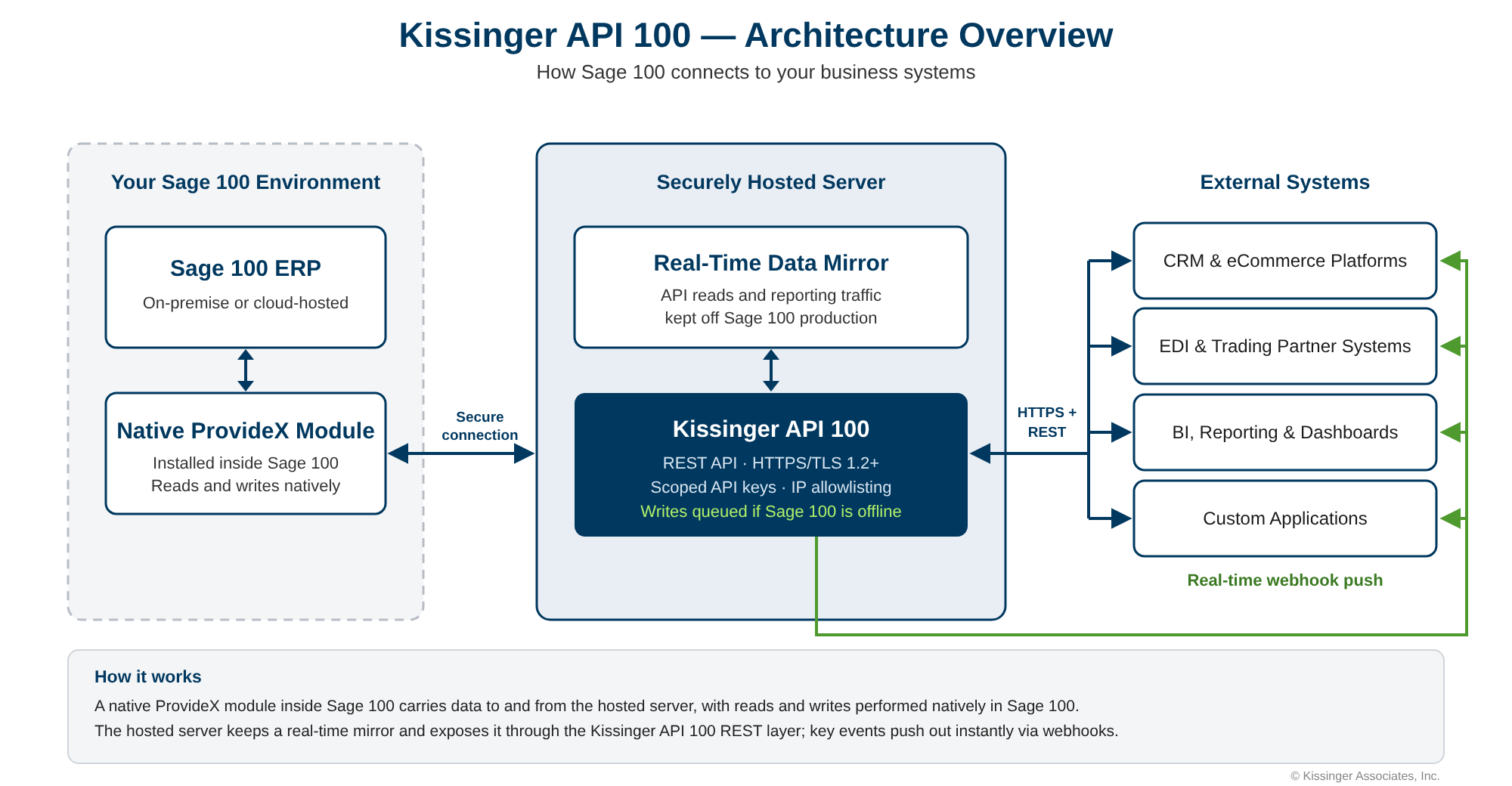
This is the architecture Kissinger API 100 is built on: a native module installed inside your Sage 100 environment carries data to and from a securely hosted server, with reads and writes performed natively in Sage 100. The hosted server maintains a real-time data mirror and exposes it through a REST API, with real-time webhooks, structured error responses, and access secured through scoped API keys and IP allowlisting.
A Quick Example
Here's roughly what a request looks like in practice: this example is illustrative; exact endpoints and parameters are in the Swagger documentation.
Reading data, checking sales order status:
GET /api/v1/so/sales-orders
Headers:
  X-API-Key: YOUR_API_KEY

Response (200 OK):
[
  {
    "SalesOrderNo": "0001234",
    "ARDivisionNo": "01",
    "CustomerNo": "ACMECORP",
    "OrderDate": "20260214",
    "OrderTotal": 50.00,
    "SalesOrderDetail": [
      { "ItemCode": "WIDGET", "QuantityOrdered": 10, "UnitPrice": 5.00 }
    ]
  }
]
Writing data, creating a new customer:
POST /api/v1/ar/customers
Headers:
  X-API-Key: YOUR_API_KEY
  Content-Type: application/json

Body:
{
  "ARDivisionNo": "01",
  "CustomerNo": "ACMEDIST",
  "CustomerName": "Acme Distribution",
  "EmailAddress": "orders@acmedistribution.com",
  "TermsCode": "30"
}
If the request fails validation (say, an invalid terms code), the API returns a structured error response identifying exactly what went wrong, the same way Sage 100 itself would flag it to a user. That's the practical benefit of an API built on business objects rather than raw database access: your integration finds out immediately, instead of writing a bad record that surfaces as a mystery weeks later.
Common Use Cases for a Sage 100 REST API
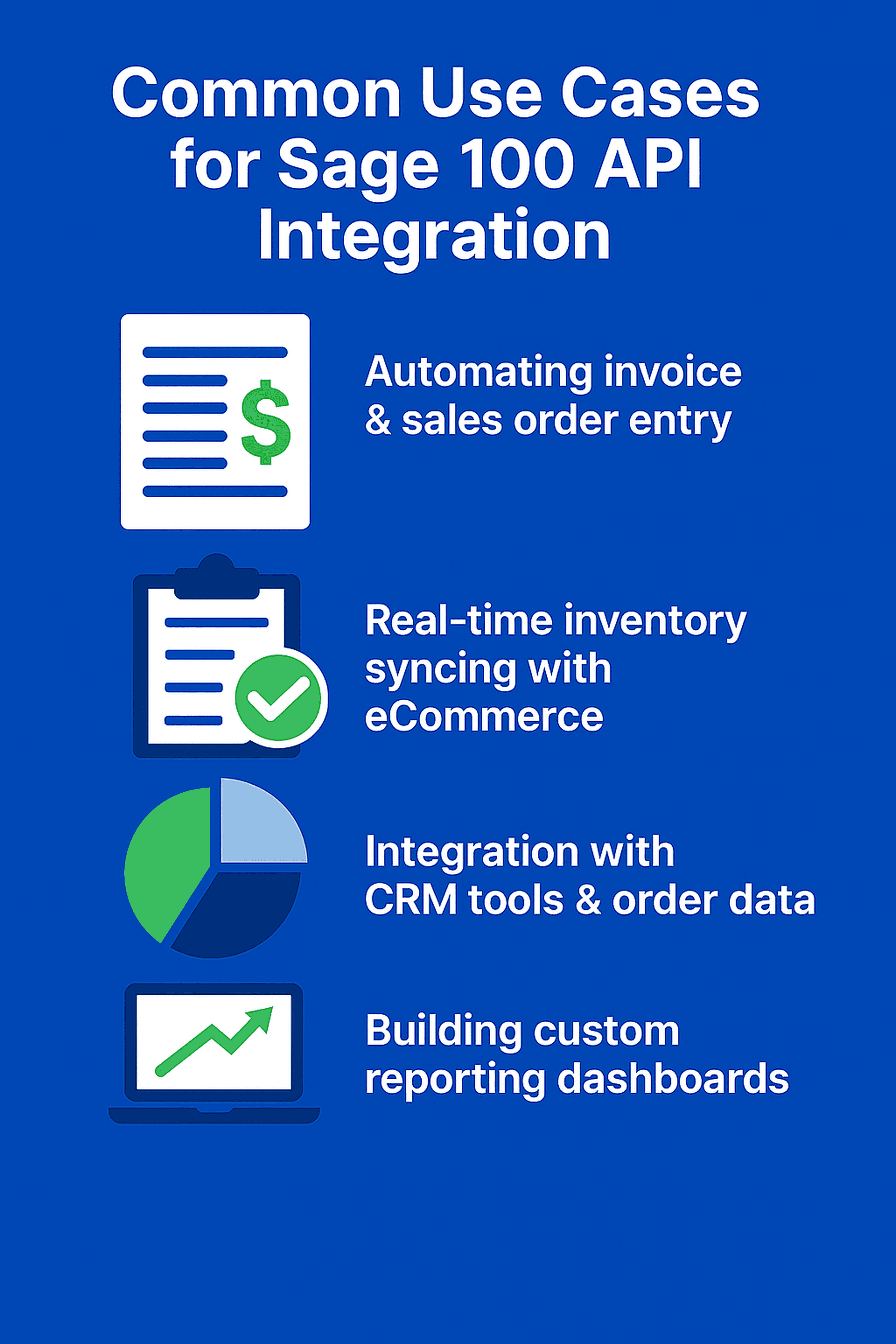
Top use cases include:
- Automating invoice and sales order entry
- Real-time inventory syncing with eCommerce platforms
- Integrating CRM tools with customer and order data
- Building custom reporting dashboards without touching Sage 100 directly
- Automating EDI or 3PL workflows
Getting Started with a Sage 100 REST API
If you're evaluating a REST API layer for Sage 100, a few things are worth confirming before you commit:
- Test in a sandbox first. Look for a vendor that offers a Swagger/OpenAPI interface or a test environment so you can experiment with endpoints without touching live data.
- Understand the authentication model. Kissinger API 100, for example, uses scoped API keys with optional IP allowlisting. Ask any vendor how access is scoped and whether keys can be limited to specific objects or actions.
- Ask what's actually being wrapped. As covered above, this is the single biggest quality signal: business objects versus raw database access.
- Confirm version compatibility. A good REST API layer should absorb Sage 100 version differences so you're not rewriting integration code with every upgrade.
- Check what happens when Sage 100 is offline. Does the API queue writes, or do they just fail?
Kissinger API 100 is compatible with all currently supported versions of Sage 100, works with both on-premise and cloud-hosted deployments, and is developed and supported directly by Kissinger Associates, which has built Sage 100 integrations since 1989, first as a Sage 100 Master Developer and now as a Sage Tech Partner.
See our full list of Sage 100 integrations →
Before You Commit
Define What You Actually Need
Not every Sage 100 reporting need requires a full API integration. If you're only looking for self-service dashboards or scheduled exports, a lighter-weight reporting tool may solve it with far less complexity and cost than a full integration project. Get clear on whether you need real-time access, scheduled reports, or simple exports before evaluating solutions. It'll save you from over-building.
Programming Language Options
Languages like JavaScript (Node.js), C#/.NET, Python, and VBScript are commonly used to interact with Sage 100 through ODBC, COM, or a REST API layer. The best choice depends on your existing tech stack and the integration approach you go with.
Best Practices for Sage 100 API Integration
Security
Use encrypted transport (HTTPS/TLS) for all API calls, and store API keys in a secure vault rather than in code. Scope keys to only the objects and actions an integration actually needs, and rotate them periodically.
Performance
Filter queries to reduce data loads rather than pulling full datasets repeatedly. Cache frequently accessed, slow-changing data locally where it makes sense. Monitor response times to catch bottlenecks early.
Documentation
Lean on Swagger/OpenAPI documentation for available endpoints, and don't be afraid to ask your integration partner directly. A good Sage 100 REST API provider should be able to explain Sage's underlying data structures, not just hand you a spec sheet.
Testing
Test all read and write operations in a sandbox before touching production. Simulate edge cases (rate limits, malformed payloads, Sage 100 being temporarily offline) to confirm your integration handles them gracefully.
Who Built Kissinger API 100
Kissinger Associates has developed Sage 100 integrations since 1989, first as a Sage 100 Master Developer and now as a Sage Tech Partner. The same team builds Kissinger API 100, our Web-Stor eCommerce platform and EDI Advantage, and supports the customers and partners who use them. Learn more about Kissinger API 100 →
Frequently Asked Questions about the Sage 100 API
What's the difference between BOI, ODBC, and a REST API for Sage 100?
BOI enforces Sage's business logic but tells you nothing when something changes elsewhere in the system, which is why most BOI integrations end up polling on a schedule instead of reacting in real time. ODBC skips that validation layer entirely, which is fine for reporting but risky for writes. A REST API built correctly keeps BOI's validation rules while adding something neither option offers on its own: knowing the instant something changes, instead of checking for it.
What happened to Sage's SDATA API?
Sage deprecated SDATA support starting with the Sage 100 2025.0 release (April 2025), and the SDATA download package itself became unavailable after September 2025. Sage's own recommendation is to migrate to BOI. If you're weighing that migration, it's worth also considering a REST API layer as an alternative, since BOI still requires polling on a schedule to detect changes rather than notifying you in real time.
Is it risky to integrate with Sage 100 directly through the database?
It can be. Direct database writes bypass Sage 100's validation, calculations, and posting rules entirely, which can produce invalid or incomplete records that don't surface as problems until later. Reading data via ODBC for reporting is generally lower-risk than writing data this way.
Do I need to be a Sage 100 developer to set up an API integration?
Not necessarily. Any language that supports REST calls and JSON (JavaScript, Python, C#, and others) can integrate with a Sage 100 REST API. Working with a Sage-certified partner can simplify access to documentation and implementation guidance, especially if you're not already familiar with Sage 100's internal data structures.
How long does it typically take to set up a Sage 100 API integration?
It depends heavily on scope: a single integration point (like syncing inventory to one eCommerce platform) is a much smaller project than a multi-system integration touching CRM, EDI, and reporting simultaneously. Starting in a sandbox environment to validate the specific endpoints you need is the fastest way to get a realistic estimate for your situation.
Can a Sage 100 REST API handle real-time updates, or is it always scheduled/batch?
This depends on the specific API. Some third-party solutions are batch/polling-based. Others, like Kissinger API 100, support real-time webhook notifications that push updates the moment something changes in Sage 100, rather than requiring external systems to check on a schedule.
Summary
Sage 100 doesn't ship a native, general-purpose REST API, but “no built-in API” doesn't mean “no good options.” BOI, ODBC, and third-party REST APIs each solve different problems, and the right choice depends on whether you're reading data, writing data, and how much you need real-time behavior versus scheduled syncs. For most integration and automation use cases, especially anything involving writes, real-time updates, or connecting Sage 100 to CRM, eCommerce, or EDI systems, a REST API built on Sage 100's own business objects, like Kissinger API 100, gives you real-time change notification without the scheduled polling that direct BOI integrations require.






.svg)
.png)